Required Action for Existing Pro Users:
If you are an existing Sign Made Easy Pro user, you must share your Salesforce Organization ID (Org ID) with the Sign Made Easy Support Team at support@signmadeasy.com after upgrading the package.
Overview
Sign Made Easy has been updated to simplify package installation and upgrade management. Previously, Sign Made Easy was distributed as two separate packages: Sign Made Easy Basic and Sign Made Easy Pro. Users had to install and manage the appropriate package separately based on their subscription.
With the latest package architecture, both Free and Pro functionalities have been merged into a single package. Users no longer need to install or maintain separate Basic and Pro packages.
However, the upgrade procedure depends on the version of Sign Made Easy Pro currently installed in your Salesforce organization. Users must follow the appropriate upgrade path to ensure that existing configurations, templates, and settings are migrated correctly.
This guide explains the required upgrade steps for users running older and newer versions of Sign Made Easy Pro.
Before You Begin
Before upgrading Sign Made Easy, please review the following recommendations:
- Identify the currently installed version of Sign Made Easy Pro in your Salesforce organization.
- Follow the upgrade path applicable to your installed version.
- Ensure that all required configurations and existing templates are reviewed before starting the upgrade.
- For older Pro versions, complete the intermediate upgrade steps before installing the latest package.
- Do not skip the Sync to V2 step when it is required for your upgrade path.
Important: Following the correct upgrade sequence is necessary to ensure that existing templates and configurations remain compatible with the updated package architecture.
Upgrade Instructions for Sign Made Easy Users
Scenario 1: Users Using Sign Made Easy Pro (versions below 1.15) or Sign Made Easy Basic (version 1.21.9 and earlier).
If you are using Sign Made Easy Pro version 1.9 or an older Pro version, including Sign Made Easy versions 1.21.9 and earlier, you must follow the intermediate upgrade process before upgrading to version 1.26.5.
Step 1: Upgrade to Pro Version 1.15
First, upgrade your existing Sign Made Easy Pro package to Pro version 1.15.
Do not skip this intermediate upgrade step.
Step 2: Upgrade to Version 1.26.5
After successfully upgrading to Pro version 1.15, upgrade the basic package to version 1.26.5
Ensure that the package upgrade completes successfully before proceeding to the next step.
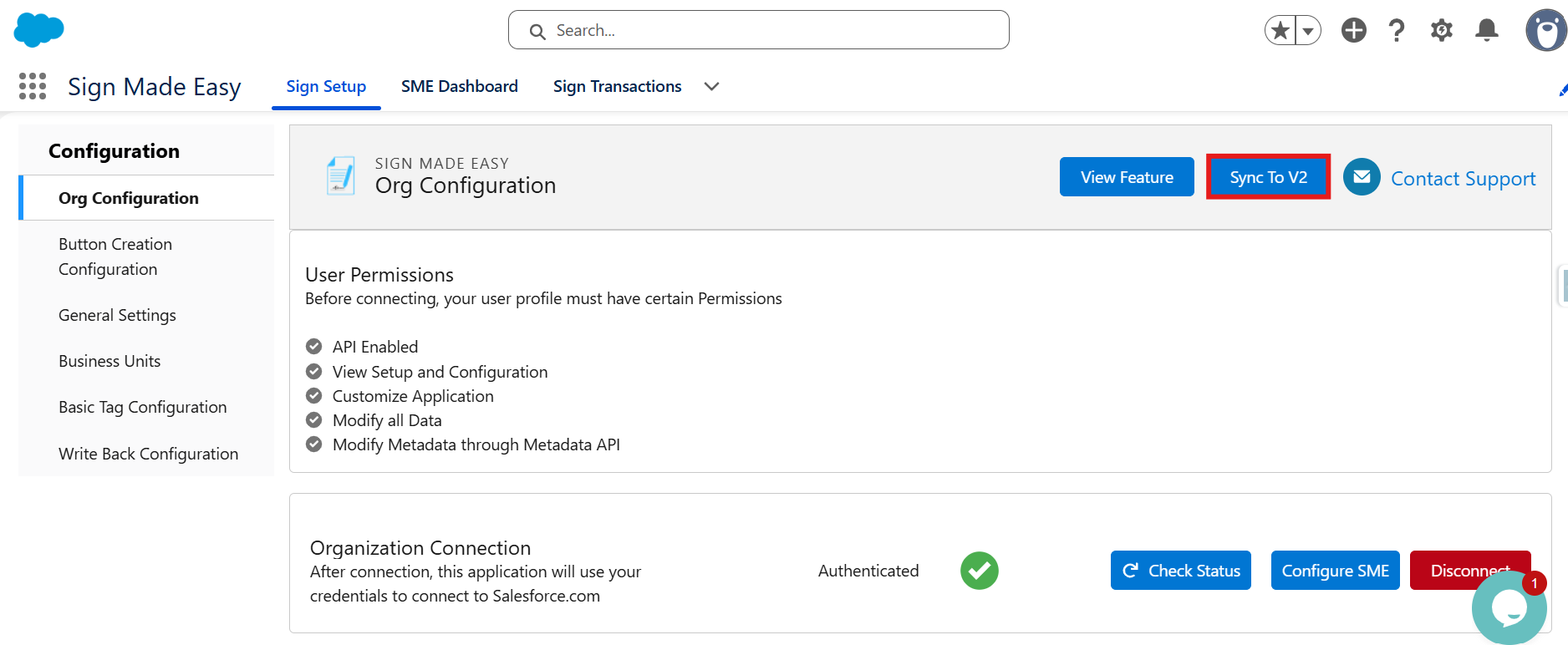
Step 3: Click the Sync to V2 Button
After upgrading to version 1.26.5, navigate to Sign Made Easy.
Click Sync to V2 to synchronize the existing settings and configurations with the updated package structure.
Wait for the synchronization process to complete before using the application.
Important: Complete all three steps in the specified order. Do not skip the intermediate Pro version 1.15 upgrade or the Sync to V2 operation.
Scenario 2: Users Using Sign Made Easy Pro (version 1.15) and Sign Made Easy Basic (version 1.22)
If you are using Sign Made Easy version 1.22 or a higher version, follow the upgrade procedure below.
Step 1: Upgrade to Version 1.26.5
Upgrade your existing Sign Made Easy Pro package to version 1.26.5.
Allow the package installation or upgrade process to complete successfully.
Step 2: Verify Existing Templates
After the upgrade, open Sign Made Easy and verify that your existing templates are available and working as expected.
Users following this upgrade path can continue using their existing templates.
Post-Upgrade Verification Checklist
After completing the upgrade, verify the following items in your Salesforce organization.
- Confirm that the package upgrade completed successfully.
- For users following Scenario 1, confirm that the Sync to V2 operation has completed successfully.
- Verify that existing Sign Made Easy configurations are available.
- Confirm that existing templates are accessible.
- Test template-based transaction creation.
- Perform a test signing transaction to confirm that the application is functioning as expected.
- If any existing templates, configurations, or features are unavailable after the upgrade, contact the Sign Made Easy support team before proceeding with regular usage.
Need Assistance?
If you are unsure which upgrade path applies to your organization, or if you encounter issues during the upgrade, contact the Sign Made Easy support team before proceeding.
Providing your Org ID will help the support team guide you through the appropriate upgrade process.
Recommendation: Always follow the upgrade sequence specified for your installed version to ensure a smooth transition to the unified Sign Made Easy package.
Package Upgrade Links
Use the links below to access the required Sign Made Easy package versions for your upgrade.
Sign Made Easy Pro Version 1.15:
Production :
Upgrade to Pro Version 1.15
SandBox :
Upgrade to Pro Version 1.15
Sign Made Easy Version 1.26.5:
Production:
Upgrade to Version 1.26.5
Sandbox:
Was this article helpful?
That’s Great!
Thank you for your feedback
Sorry! We couldn't be helpful
Thank you for your feedback
Feedback sent
We appreciate your effort and will try to fix the article